Computer fundamentals is an important topic for students preparing for SSC, Railway, Banking, Police, and other competitive examinations. Questions may cover the definition of a computer, its characteristics, generations, types, components, hardware, software, and applications.
In these computer fundamentals notes, you will learn the basic concepts in simple English, with practical examples, comparison tables, important examination points, and 15 original practice MCQs with answers and explanations.
1. What Is a Computer?
A computer is an electronic, programmable device that accepts data and instructions, processes the data according to a set of instructions, and produces useful results. It can also store data and retrieve it when required.
Example: Suppose you want to calculate the total price of five books costing ₹100 each. You enter the price and quantity, the computer performs the multiplication, and it displays the result of ₹500.
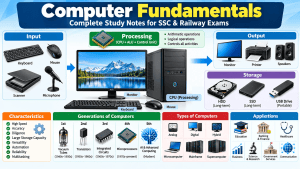
The basic working principle of a computer is known as the Input-Process-Output (IPO) cycle.
- Input: Data and instructions are entered into the computer.
- Processing: The computer processes the input according to instructions.
- Output: The computer presents the result.
- Storage: Data and results can be stored for future use.
For example, a keyboard can be used to enter numbers, the CPU can perform calculations, a monitor can display the result, and an SSD can store the result in a file.
2. Characteristics of Computers
Computers are widely used because they can perform many tasks quickly and consistently. The following characteristics are important for computer awareness examinations.
2.1 High Speed
A computer can perform a large number of operations in a very short time. It is useful for calculations, data processing, simulations, and other repetitive tasks.
Example: A computer can calculate totals for thousands of sales transactions much faster than doing each calculation manually.
2.2 Accuracy
A computer can produce highly accurate results when the data, instructions, and software are correct. Incorrect input or faulty instructions can still produce incorrect results.
Example: A spreadsheet can calculate monthly expenses accurately when the formulas and entered figures are correct.
2.3 Diligence and Consistency
A computer can repeat the same operation many times without becoming tired in the human sense. Its performance still depends on hardware conditions, software, power, cooling, and maintenance.
2.4 Storage Capacity
Computers can store large amounts of data, including documents, photographs, videos, and databases. The amount of data stored depends on the available storage device.
2.5 Versatility
A computer can perform different types of tasks, such as preparing documents, editing videos, managing accounts, designing buildings, and conducting scientific calculations.
2.6 Automation
Once a task has been properly programmed and started, a computer can perform many steps automatically with limited human intervention.
Example: A payroll system can calculate employee salaries according to configured rules and entered attendance data.
2.7 Reliability
A properly configured and maintained computer can perform repeated tasks consistently. Reliability can be affected by hardware faults, software errors, power problems, and other conditions.
2.8 Multitasking
Modern operating systems can manage multiple applications and tasks. For example, a user may listen to music, download a file, and edit a document at the same time.
2.9 Limitations of Computers
Computers do not automatically understand every situation as humans do. Their results depend on programs, available data, system design, and the task being performed. They can also produce biased or incorrect results when the input or underlying logic is flawed.
3. Generations of Computers
The development of computers is commonly divided into five generations according to major changes in electronic technology and computing methods. These divisions are useful for examinations, although dates and descriptions can vary across textbooks.
3.1 First Generation: Vacuum Tubes
The first generation is commonly associated with the 1940s and 1950s. These computers used vacuum tubes for electronic circuitry.
- They were very large and often occupied entire rooms.
- They consumed considerable electrical power and generated substantial heat.
- They were expensive to operate and maintain.
- Machine language was used for programming.
- Punched cards and paper tape were common input methods.
Examples: ENIAC and UNIVAC I.
3.2 Second Generation: Transistors
The second generation emerged during the 1950s and 1960s. Transistors replaced vacuum tubes in many computer designs.
- Computers became smaller than many first-generation systems.
- They generally consumed less power and generated less heat.
- Reliability and processing performance improved.
- Assembly language and high-level languages such as FORTRAN and COBOL were used.
Example: IBM 1401.
3.3 Third Generation: Integrated Circuits
The third generation is associated with the 1960s and early 1970s. Integrated circuits (ICs) placed multiple electronic components on a semiconductor chip.
- Computers became smaller and more efficient.
- Processing performance and reliability improved.
- Operating systems and multiprogramming became increasingly important.
- Computers became more practical for business and institutional use.
Examples: IBM System/360 family and PDP-8.
3.4 Fourth Generation: Microprocessors
The fourth generation began with the development of microprocessor-based computers in the 1970s. A microprocessor integrates major CPU functions onto a chip.
- Personal computers became widely available.
- Computers became more compact and affordable.
- Processing power and storage capabilities increased.
- Graphical user interfaces became common in personal computing.
Examples: IBM PC and Apple Macintosh.
3.5 Fifth Generation: Artificial Intelligence and Advanced Computing
The fifth generation is commonly associated in educational textbooks with artificial intelligence, advanced semiconductor technology, and parallel processing.
- AI techniques are used in applications such as language processing, image recognition, and decision support.
- Modern systems can process large datasets and perform complex tasks.
- Advanced processors, high-capacity storage, and networked computing support sophisticated applications.
Examples of relevant modern computing systems: AI-enabled computers, intelligent robots, and systems that use machine learning. These examples illustrate current technologies; there is no universally accepted rule that every modern computer belongs exclusively to a fifth generation.
Comparison Table: Generations of Computers
| Generation | Main Technology | Important Feature | Example |
|---|---|---|---|
| First | Vacuum tubes | Large size and high heat production | ENIAC |
| Second | Transistors | Smaller and more efficient than many earlier systems | IBM 1401 |
| Third | Integrated circuits | Multiple electronic components on chips | IBM System/360 |
| Fourth | Microprocessors | Growth of personal computing | IBM PC |
| Fifth | AI-oriented and advanced computing technologies | Emphasis on intelligent applications and advanced processing | AI-enabled systems |
Exam memory trick: Vacuum Tubes → Transistors → Integrated Circuits → Microprocessors → AI-oriented Computing.
4. Types of Computers
Computers can be classified according to the type of data they process, their size and processing capacity, and their intended use.
4.1 Types Based on Data Processing
Analog Computers
Analog computers work with continuously varying physical quantities, such as temperature, pressure, or voltage. They are associated with specialized measurement, simulation, and control applications.
Digital Computers
Digital computers process data represented in discrete form, typically using binary digits (0 and 1).
Examples: Desktop computers, laptops, smartphones, and digital calculators.
Hybrid Computers
Hybrid computers combine analog measurement or processing with digital computing. They are useful when a system needs to work with physical measurements and digital calculations.
Example: A specialized medical monitoring or industrial control system that combines sensor measurements with digital processing.
4.2 Types Based on Size and Processing Capability
Microcomputers
Microcomputers are generally designed for individual use and are based on microprocessor technology.
Examples: Desktop computers, laptops, tablets, and personal computing devices.
Minicomputers
Minicomputer is a historical classification for midrange systems that supported multiple users or departmental workloads. The term is less common in modern product classifications.
Mainframe Computers
Mainframes are designed for high-volume transaction processing, large-scale data handling, and workloads requiring high availability and reliability.
Applications: Banking transactions, insurance processing, and large organizational databases.
Supercomputers
Supercomputers provide extremely high computational performance for complex scientific and engineering workloads.
Applications: Weather forecasting, climate modelling, scientific simulations, and advanced research.
4.3 Types Based on Purpose
General-Purpose Computers
These computers can perform many different tasks by running different programs.
Examples: Personal computers used for studying, browsing, accounting, and entertainment.
Special-Purpose Computers
These systems are designed or configured for a particular task or a limited set of tasks.
Examples: Embedded controllers in washing machines, traffic-control systems, and certain industrial machines.
5. Basic Components of a Computer
A computer system contains hardware and software that work together. Its main functional components include input, processing, memory, storage, and output.
5.1 Input Unit
The input unit accepts data and instructions from the user or another device.
Examples: Keyboard, mouse, scanner, microphone, and touchscreen.
5.2 Central Processing Unit (CPU)
The CPU executes instructions and coordinates many of the computer’s operations. It is often described as the brain of the computer in introductory textbooks.
- Arithmetic Logic Unit (ALU): Performs arithmetic operations and logical comparisons.
- Control Unit (CU): Coordinates instruction execution and the movement of control signals.
- Registers: Small, high-speed storage locations used during processing.
5.3 Memory and Storage
Memory holds data and instructions needed during processing. RAM is commonly used as working memory, while ROM and other non-volatile memory technologies retain firmware or other instructions.
Secondary storage, such as an SSD or HDD, keeps files and programs for future use.
5.4 Output Unit
The output unit presents processed information in a form the user can understand.
Examples: Monitor, printer, projector, and speakers.
6. Hardware and Software
Hardware and software are two essential parts of a computer system.
Computer Hardware
Hardware refers to the physical components that can be touched or physically handled.
Examples: CPU, keyboard, monitor, RAM, motherboard, and SSD.
Computer Software
Software consists of programs and instructions that tell a computer what tasks to perform.
System software: Supports the operation and management of the computer. Examples include operating systems and device drivers.
Application software: Helps users perform specific tasks. Examples include word processors, spreadsheet applications, web browsers, and presentation software.
| Basis | Hardware | Software |
|---|---|---|
| Meaning | Physical components | Programs and instructions |
| Can be physically touched? | Yes | No |
| Examples | Keyboard, CPU, monitor | Operating system, browser, word processor |
| Role | Provides physical computing resources | Directs the system to perform tasks |
7. Applications of Computers
Computers are used in almost every major sector because they support data processing, communication, analysis, automation, and record keeping.
7.1 Education
Computers support online classes, digital textbooks, educational videos, online examinations, simulations, and computer-based tests.
7.2 Banking and Finance
Banks use computer systems for account management, electronic transactions, fraud monitoring, record keeping, and customer services.
7.3 Healthcare
Hospitals use computers for patient records, appointment scheduling, diagnostic imaging, laboratory systems, and administrative work.
7.4 Business and Commerce
Businesses use computers for accounting, billing, inventory management, payroll, customer records, and sales analysis.
7.5 Science and Engineering
Computers help researchers analyse data, run simulations, design products, model physical systems, and solve complex mathematical problems.
7.6 Communication
Email, video conferencing, messaging, and online collaboration depend on computer systems and communication networks.
7.7 Government Services
Government departments use computers for record management, online applications, public services, data processing, and administrative operations.
7.8 Transport and Weather Forecasting
Computer systems support ticket reservations, traffic management, navigation, logistics, weather modelling, and climate research.
7.9 Entertainment and Media
Computers are used for gaming, animation, video editing, music production, digital photography, and content creation.
8. Important Computer Fundamentals Points for Exams
- A computer follows instructions to process data and produce useful results.
- The basic working model is Input-Process-Output (IPO).
- CPU stands for Central Processing Unit.
- ALU stands for Arithmetic Logic Unit.
- CU stands for Control Unit.
- Hardware consists of physical computer components.
- Software consists of programs and instructions.
- RAM is generally volatile working memory.
- ROM is non-volatile memory traditionally used for firmware and essential instructions.
- First-generation computers used vacuum tubes.
- Second-generation computers used transistors.
- Third-generation computers used integrated circuits.
- Fourth-generation computers are associated with microprocessors.
- Fifth-generation descriptions commonly emphasize AI and advanced computing.
- Analog computers process continuously varying quantities.
- Digital computers process discrete data, usually represented in binary form.
- Hybrid computers combine analog and digital approaches.
- Mainframes support large-scale transaction and data-processing workloads.
- Supercomputers are designed for highly demanding computational tasks.
- Input devices enter data, while output devices present results.
9. Practice MCQs on Computer Fundamentals
Attempt these 15 original practice questions to revise the topic. They are newly written practice questions, not claims about questions asked in previous-year examinations.
Question 1
What is the basic function of a computer?
- Only to print documents
- To accept data, process it, and produce results
- Only to store photographs
- Only to connect to the Internet
Correct Answer: B. To accept data, process it, and produce results
Explanation: A computer accepts data and instructions, processes them, and produces useful output. It can also store and retrieve data.
Question 2
Which component is commonly called the brain of the computer?
- Monitor
- Keyboard
- CPU
- Printer
Correct Answer: C. CPU
Explanation: The CPU executes instructions and coordinates many operations of the computer system.
Question 3
Which characteristic enables a computer to perform many calculations quickly?
- Speed
- Colour
- Physical size
- Screen brightness
Correct Answer: A. Speed
Explanation: Computers can execute large numbers of operations in a short time, depending on the hardware and task.
Question 4
Which electronic component was used in first-generation computers?
- Microprocessor
- Transistor
- Integrated circuit
- Vacuum tube
Correct Answer: D. Vacuum tube
Explanation: First-generation computers used vacuum tubes for electronic circuitry.
Question 5
Which technology is associated with second-generation computers?
- Vacuum tubes
- Transistors
- Microprocessors
- Artificial intelligence alone
Correct Answer: B. Transistors
Explanation: Transistors replaced vacuum tubes in second-generation computer designs.
Question 6
Integrated circuits are associated with which generation of computers?
- First generation
- Second generation
- Third generation
- Fourth generation
Correct Answer: C. Third generation
Explanation: Third-generation computers used integrated circuits to combine multiple electronic components on chips.
Question 7
Which generation is commonly associated with microprocessors?
- Fourth generation
- First generation
- Second generation
- Third generation
Correct Answer: A. Fourth generation
Explanation: Fourth-generation computers are associated with microprocessor technology and the growth of personal computing.
Question 8
Which type of computer processes continuously varying physical quantities?
- Digital computer
- Analog computer
- General-purpose digital computer only
- Word processor
Correct Answer: B. Analog computer
Explanation: Analog computers work with continuous quantities such as voltage, temperature, or pressure.
Question 9
Which type of computer combines analog and digital approaches?
- Mainframe
- Supercomputer
- Microcomputer
- Hybrid computer
Correct Answer: D. Hybrid computer
Explanation: Hybrid systems combine analog measurement or processing with digital computation.
Question 10
Which of the following is an input device?
- Monitor
- Speaker
- Keyboard
- Projector
Correct Answer: C. Keyboard
Explanation: A keyboard allows users to enter text, numbers, and commands into a computer.
Question 11
Which part of the CPU performs arithmetic operations and logical comparisons?
- ALU
- Monitor
- Keyboard
- SSD
Correct Answer: A. ALU
Explanation: The Arithmetic Logic Unit performs arithmetic calculations and logical comparisons.
Question 12
Which of the following is an example of system software?
- Photo album
- Operating system
- Presentation file
- Digital photograph
Correct Answer: B. Operating system
Explanation: An operating system manages computer resources and provides services for applications.
Question 13
Which type of computer is designed for highly demanding scientific calculations?
- Basic keyboard
- Optical mouse
- Simple calculator only
- Supercomputer
Correct Answer: D. Supercomputer
Explanation: Supercomputers are designed for demanding computational tasks such as scientific simulations and weather modelling.
Question 14
Which characteristic allows a computer to repeat programmed operations without becoming tired in the human sense?
- Versatility
- Screen resolution
- Diligence
- Physical size
Correct Answer: C. Diligence
Explanation: Diligence describes a computer’s ability to perform repetitive operations consistently without human-like fatigue.
Question 15
Which of the following is a common application of computers in healthcare?
- Patient record management
- Only changing the colour of furniture
- Only manufacturing paper
- Only sharpening pencils
Correct Answer: A. Patient record management
Explanation: Healthcare organizations use computers to manage patient records, appointments, diagnostic information, and administrative tasks.
10. Frequently Asked Questions (FAQs)
1. What are computer fundamentals?
Computer fundamentals are the basic concepts required to understand computers, including their characteristics, components, generations, types, memory, hardware, software, and applications.
2. What are the main characteristics of a computer?
Commonly taught characteristics include speed, accuracy, diligence, storage capacity, versatility, automation, reliability, and multitasking. Actual performance depends on the system and task.
3. What are the five generations of computers?
The conventional classification covers vacuum tubes, transistors, integrated circuits, microprocessors, and AI-oriented or advanced computing technologies. The exact dates and boundaries vary among educational sources.
4. What are the main types of computers?
Computers may be classified as analog, digital, and hybrid based on data processing; as microcomputers, minicomputers, mainframes, and supercomputers based on traditional size and capability classifications; or as general-purpose and special-purpose systems based on use.
5. Why are computer fundamentals important for SSC and Railway exams?
Computer fundamentals provide the foundation for topics such as computer awareness, memory, operating systems, input and output devices, networking, office applications, and cybersecurity. Studying the basics helps candidates prepare for a broader range of computer-related questions.
Conclusion
Computer fundamentals form the foundation of computer awareness. Understanding the IPO cycle, characteristics of computers, generations, types, hardware, software, and applications makes it easier to learn advanced topics.
For SSC and Railway preparation, revise the comparison tables, remember the main technologies used in each computer generation, and practise the MCQs regularly. Focus on understanding each concept rather than memorizing isolated facts.